Review: Zoom H6

Zoom H6 – perspective 1

Zoom have released their new handy recorder flagship:

The Zoom H6 is a six-track mobile recorder with exchangeable microphone modules.

****

Zoom H6 – package and case

Zoom’s H6 (rrp in Finland: 398 €) comes in its own carrying case.
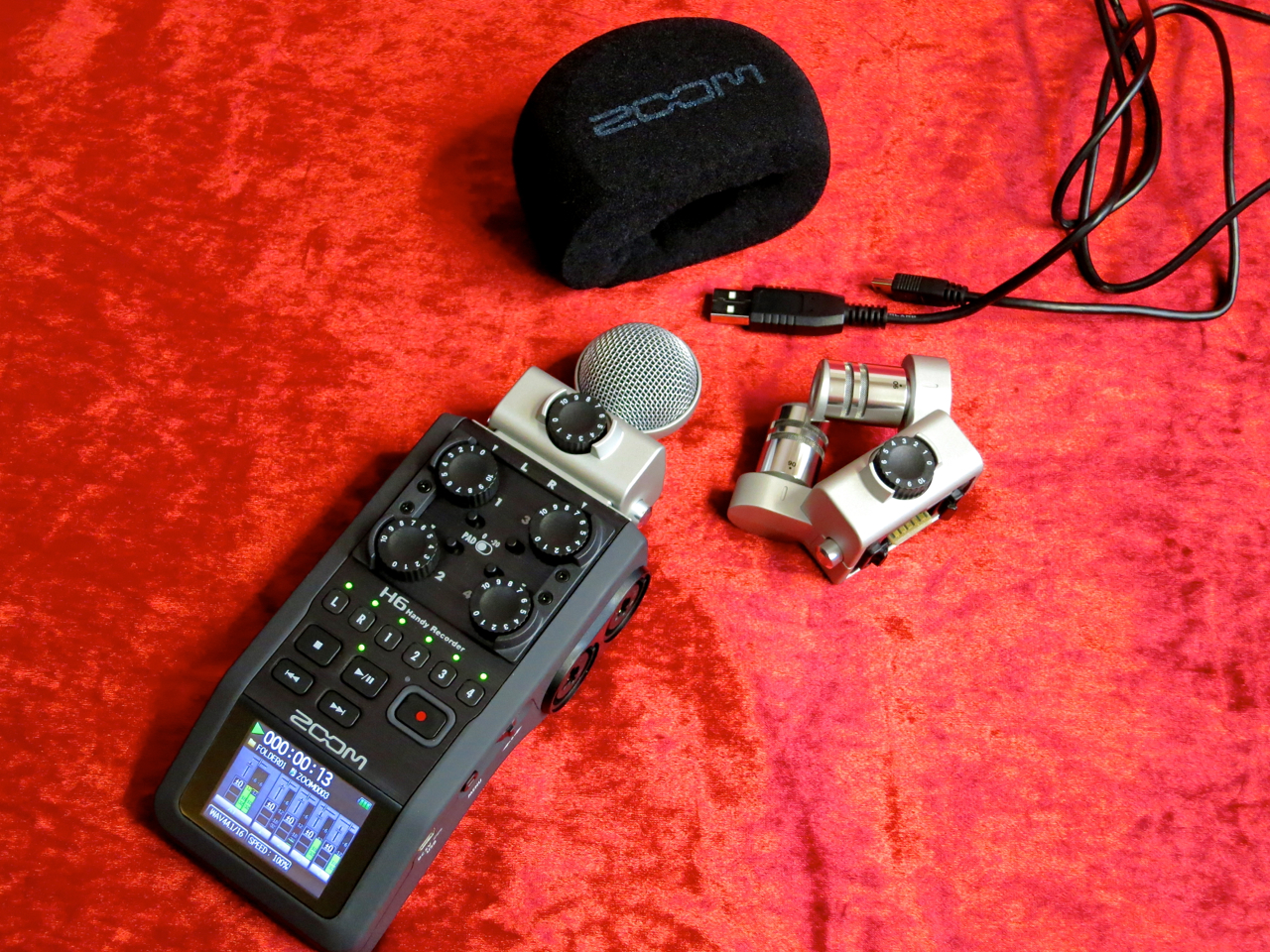
Zoom H6 – the set

The package includes the H6 itself, two mic modules – the XYH-6 offering XY-stereo and the MSH-6 with an MS-stereo capsule – a foam windscreen, a USB-cable, four AA-size batteries and a 2 GB SD-card.

Also included is Steinberg’s Cubase LE audio-sequencer software.
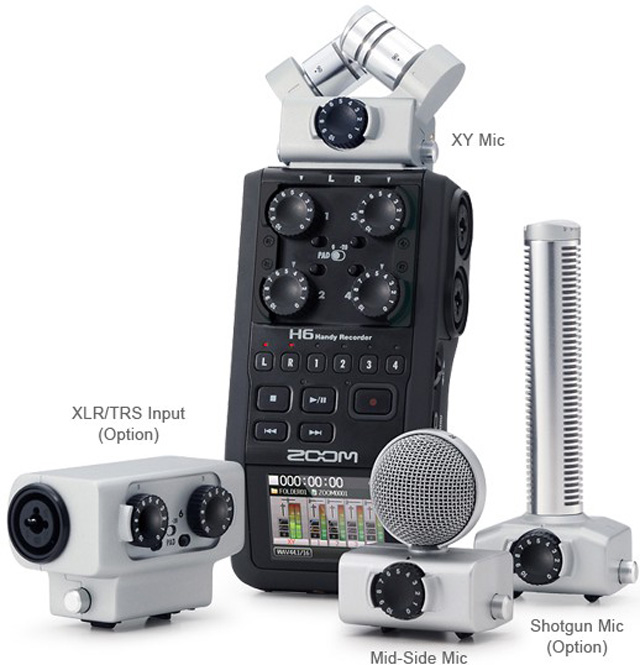
h6n

At the moment the H6 is the only field recorder offering you different exchangeable mic and preamp modules.

In addition to the supplied XY- and MS-modules you can also buy Zoom’s shotgun module (SGH-6) or a module with an additional pair of XLR-/TRS-inputs (EXH-6).

Zoom H6 – accessory pack

For this review we were also supplied with Zoom’s accessory pack for the H6 (APH-6), which contains a furry windshield for outdoor recording, as well a USB-power supply and a remote control.

****

Zoom H6 – XY-module

Except for its control panel the Zoom H6 is entirely covered in a non-slip rubbery coating, which also cuts down on handling noise during recording.

Zoom H6 – XY 90 deg

A typical Zoom-feature has been carried over into the recorder’s XY-module:

You can switch the stereo width of the XY-setup by turning the capsules. The options are the slightly narrower 90 degrees angle…

Zoom H6 – XY 120 deg

…and the wider pickup pattern of 120 degrees.

Zoom H6 – left side view

The combined XLR/TRS-connectors have been placed on both sides of the H6. The Zoom offers switchable phantom power for condenser mics.

On the left side you’ll find the access to the SD-card, as well as the headphones output and the volume control.
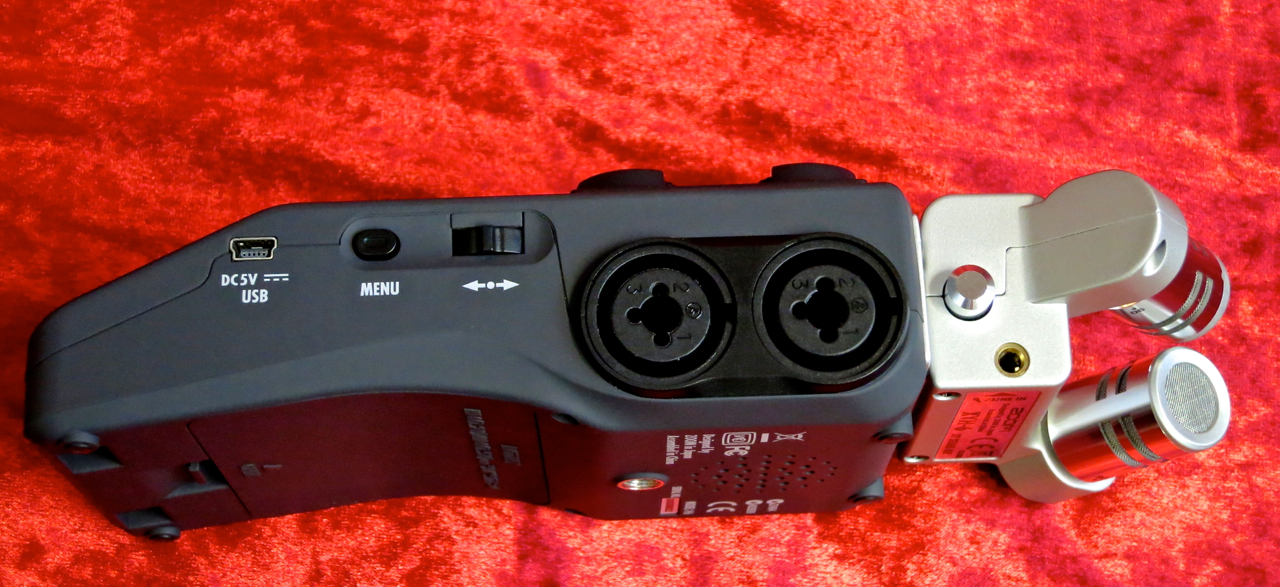
Zoom H6 – right side view

In addition to the recorder’s mini-USB-port the right side is home to the Menu-button and the device’s nifty navigation toggle.
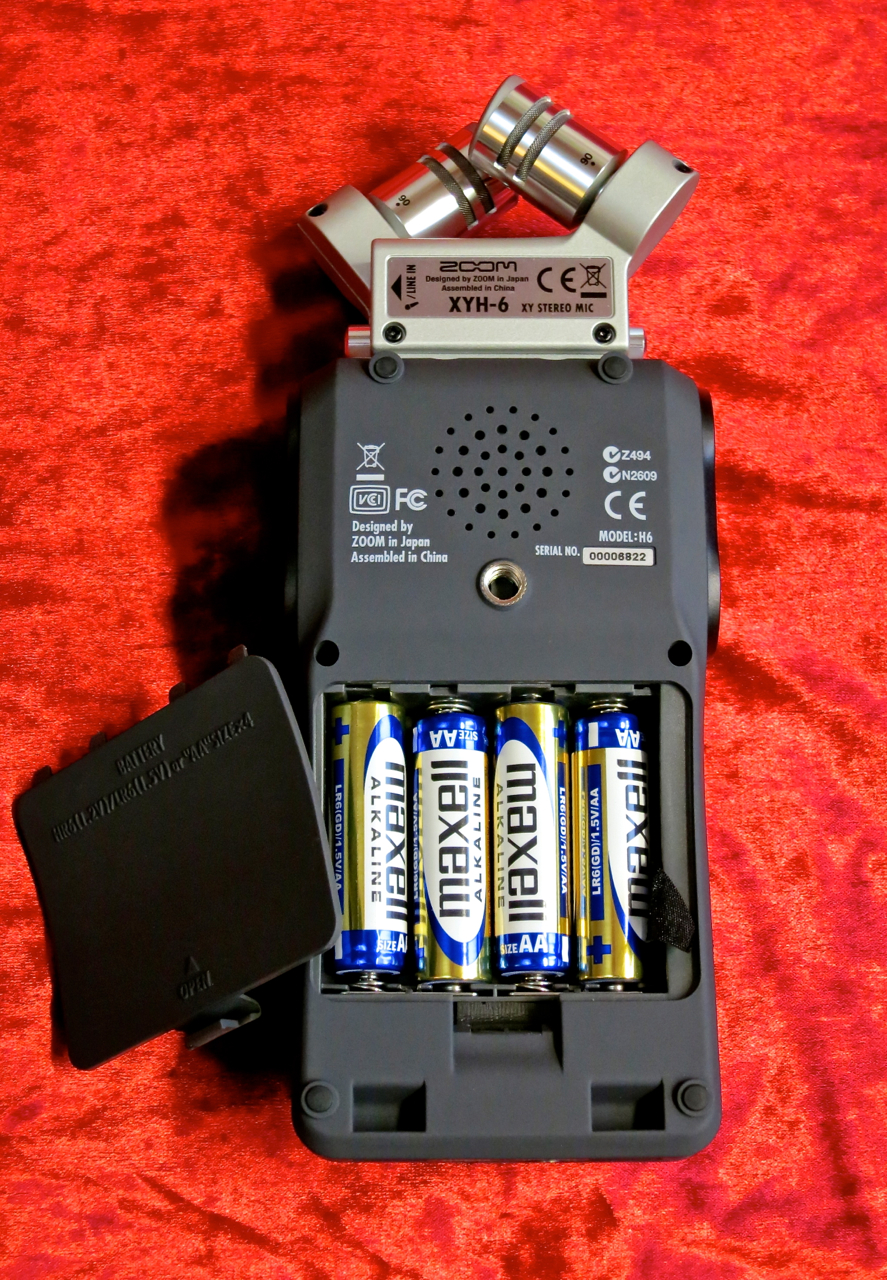
Zoom H6 – back view

This recorder runs on four AA-size batteries, and will run for approximately 20 hours on a fresh set of alkalines.

You can place the Zoom on most camera tripods, thanks to its standardised thread. There’s also the HS-1 hot shoe adapter available, which makes it possible to mount the recorder straight onto a camera.

The small monitor speaker isn’t particularly Hi-Fi, but it’s good to have it for quick checks.

Zoom H6 – line + remote

The unit’s line level output, as well as the connector for the optional remote control, has been placed on the bottom rim of the Zoom.

****

The Zoom H6 can handle two audio formats:

Linear WAV-files offer you sample rates of 44.1, 48 or 96 kHz with 16 or 24 bits of resolution. When you choose WAV as your recording format the H6 works as a multitrack recorder, which makes it possible to do overdubs, and which allows you to mix the recorded tracks afterwards. You can do your mixdown internally, using the Zoom’s own Project Mixer, or by exporting the separate tracks to an audio-sequencer.

Another function that only works when you’ve chosen WAV as your recording format is called Backup Record. This nifty function records the input signal from the exchangeable module twice – one set of tracks uses your input gain settings and is routed to the L/R-track, as usual, while the second set is recorded with 12 dB of attenuation as the so-called Backup-track. The Backup-track is your safety in case your own settings were too hot.

The big advantage of using the H6 in MP3-mode is, of course, this mode’s greatly extended recording time, made possible by data reduction. The recorder lets you choose from many different recording quality settings between 48 and 320 kbps. When in MP3-mode you use the Zoom’s Monitor Mixer to mix all of the six inputs into one stereo file, which is the recorded. This means that, when recording using the MP3-format, the end result is always a single stereo file, instead of the separate tracks you get when running in WAV-mode.
Zoom H6 – MS-module

When you’re using the MS-module you can adjust the side-mic level, either before recording (WAV and MP3) or afterwards if you’ve recorded the module’s input signal using the Zoom’s MS-Raw-mode (WAV only).

More information on MS-stereo can be found HERE.

****

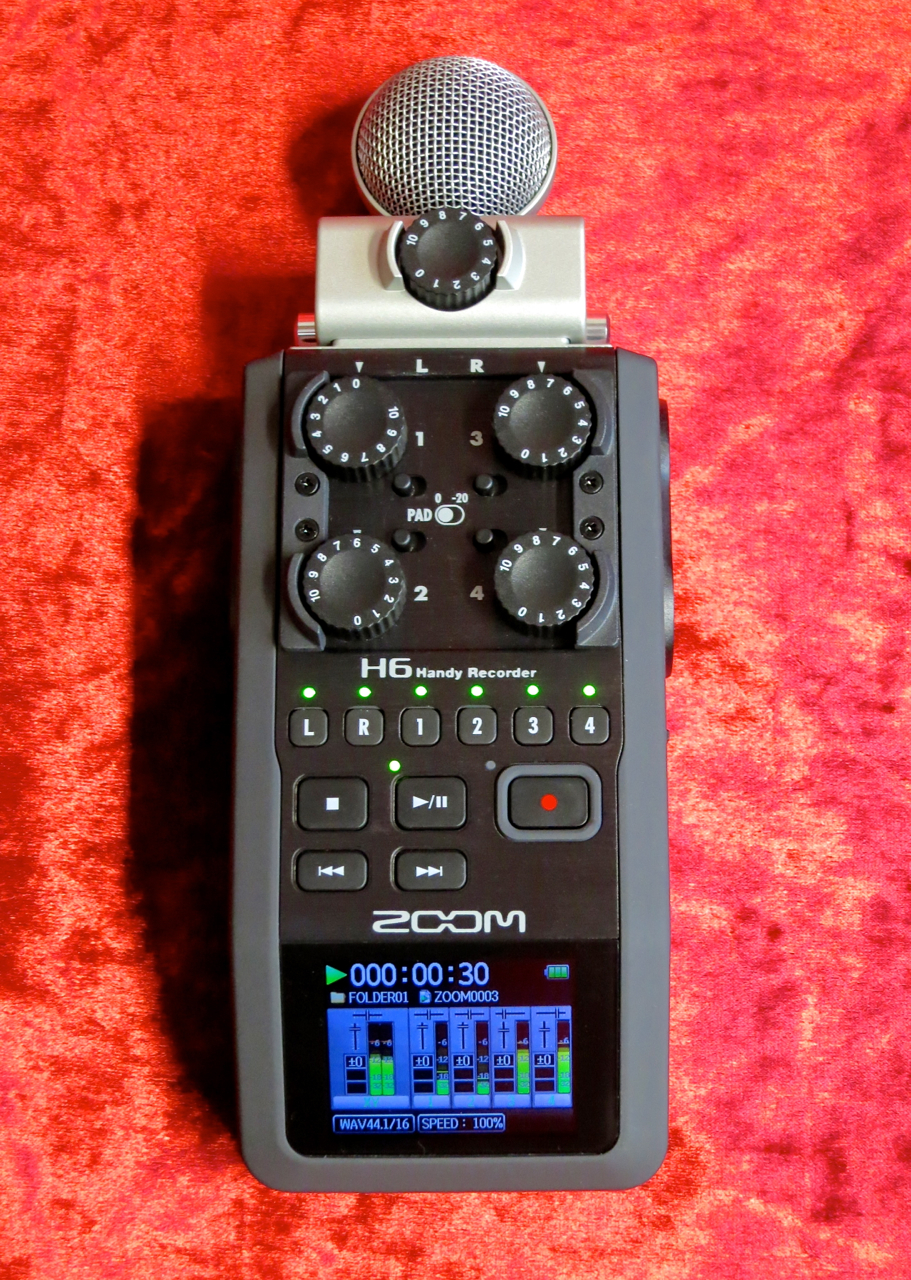
Zoom H6 – level knobs

The Zoom H6 is very easy to use, because the signal routing is fixed:

The module’s output always goes to the L/R-track (stereo), while inputs one to four are routed to their corresponding mono tracks (1-4).

Zoom H6 – display

Beneath the Gain-controls there’s a row of track status buttons, as well as the recorder’s ”transport” buttons.

Zoom H6 – monitor mixer

The Zoom’s Monitor Mixer is where you adjust the signal levels and pan positions of all the signals for monitoring.

The Monitor Mixer window also shows you the status of each channel’s bass cut, compressor/limiter and phantom power.

Zoom H6 – menu view

This is what the Menu-view looks like.

Zoom H6 – project mixer

To mix down recorded tracks you use a different internal mixer, called the Project Mixer.

The Project Mixer allows you to adjust each track’s volume and pan position, as well as the playback pitch for each track (without changing the playback speed).

****

Zoom H6 – top view

In my opinion Zoom’s H6 hits the bull’s eye:

The exchangeable mic modules give you an enormous amount of flexibility to tailor the recorder quickly to the recording situation you find yourself in. The H6 is easy to use, and the recorder’s sound quality is very, very good. Thanks to the built-in metronome and chromatic tuner it’s easy to make sure you play in time and in tune. I’ve also enjoyed the Zoom’s nice compressors and limiters, which work very musically.

To demonstrate the H6’s performance and sound I recorded a short song using the recorder’s overdub function. I used the X/Y-module (at 90 deg) to record the steel-string acoustic, and recorded two mandolin tracks and two vocals with my trusty Shure SM57.

First, I mixed the song using the Zoom’s internal mixer, after which I exported the stereo file to Garageband, where I cut off the count-in and added a little bit of reverb:

I also tried taking the other route by exporting all the separate files from the H6 into Garageband, where I remixed the song using the original tracks:

****

I used a series of sine-wave sweeps to give you an idea of the effect the side-mic level has on the stereo-width of the recorded material. The lower the side-mic level is, the narrower your stereo image gets.

Side-mic +6dB:

Side-mic -2 dB:

Side-mic -9 dB:

Side-mic -22 dB:

Side-mic off:

****

Zoom H6 – perspective 2

I think Zoom’s H6 is a great field recorder and portable multi-track studio. The H6 works great to capture your song ideas or to for quality recordings of your band rehearsals or live gigs. The Zoom makes pro-quality recording on the road possible.

****

Zoom H6

Finnish distributor: Studiotec

Zoom H6 – 398 €

APH-6 – 48 €

EXH-6 – 58 €

SGH-6 – 118 €

****

Pros:

+ exchangeable L/R-modules

+ rugged build

+ colour display

+ Overdub-, Pre Record- ja Backup Record -functions

+ quality compressor/limiter-section

****

Testipenkissä: Zoom H6

Zoom H6 – perspective 1

Zoomilla on uusi pikkutallentimien lippulaiva:

Zoom H6 on kuusiraitainen kannettava tallennin, joka tarjoaa vaihtomoduulien kautta erilaisia mikrofoniratkaisuja.

****

Zoom H6 – package and case

Zoom H6 (suositushinta 398 €) myydään omassa kätevässä laukussa.

Zoom H6 – the set

Laukun sisältä löytyy H6:n runko, kaksi mikrofonimoduulia – XY-stereota tarjoava XYH-6 ja MS-stereomikrofoni MSH-6 – vaahtomuovinen tuulisuoja, USB-johto, neljä AA-paristoa, sekä 2 GB:n SD-kortti.

Tämän lisäksi pakettiin kuuluu myös Cubase LE -softasekvensseri.

h6n

H6 on tällä hetkellä ainoa kämmenkokoinen tallennin, joka tarjoaa mahdollisuuden vaihtaa tallentimen mikrofonivarustusta erilaisilla moduuleilla.

Lisävarusteena voi ostaa itselleen XY- ja MS-moduulien lisäksi Zoomiin sopiva haulikkomikki (SGH-6) tai sitten kaksi XLR/TRS-lisätuloja tarjoavaa vaihtoehtoa (EXH-6).

Zoom H6 – accessory pack

Testiin saatiin myös Zoomin kätevä lisävarustepaketti (APH-6), josta löytyy karvainen tuulisuoja ulkotyöskentelyä varten, sekä H6:lle sopiva USB-virtalähde ja langallinen kauko-ohjain.

****

Zoom H6 – XY-module

Zoom H6:n metallista etupaneelia lukuun ottamatta laitteen runkoa on päällystetty käsittelyääniä vaimentavalla kumimaisella kuorella.

Zoom H6 – XY 90 deg

Yksi Zoom-tallentimille tyypillisistä ominaisuuksista löytyy myös XY-moduulista:

Mikrofonikapseleiden kulmaa voi säätää kääntämällä. Vaihtoehtoina tarjotaan hieman kapeampaa 90:n asteen kulmaa…

Zoom H6 – XY 120 deg

…sekä leveämpi 120:n asteen asentoa.

Zoom H6 – left side view

H6:n XLR/TRS-kombiliitimet on sijoitettu kätevästi laitteen molempiin kylkiin. Tuloista voi lähettää tarvittaessa phantom-virtaa kondensaattorimikrofoneja varten.

Vasen kylki tarjoaa tulojen lisäksi muistikorttipaikan, kuulokelähdön, sekä volumesäätimen.

Zoom H6 – right side view

Oikeasta kyljestä taas löytyy minikokoisen USB-portin lisäksi vielä Zoomin Menu-nappi ja H6:n sulavasti toimiva navigointivipu.

Zoom H6 – back view

Laitteen pohjaan on upotettu sen paristolokero neljälle AA-kokoisille paristoille. Alkaliparistoilla H6 toimii noin 20 tuntia.

Standardisoidun kierteensä ansiosta Zoomin voi kiinnittää suoraan tavalliseen kamerajalustaan, tai HS-1-kamera-adapterilla myös suoraan kameran salamakiinnikkeeseen.

Zoom H6:lla on myös pieni sisäinen monitorikaiutin.

Zoom H6 – line + remote

Zoomin linjalähtö, sekä H6:n liitin kauko-ohjaimelle on sijoitettu tallentimen etureunaan.

****

Zoom H6 käyttää kahta audioformaattia:

Lineaariset WAV-tiedostot tarjoavat 44,1:n, 48:n tai 96:n kilohertsin näytetaajuudet 16- tai 24-bittisinä. Kun WAV on valittu äänitysformaatiksi, tallennin toimii moniraiturina, jolloin jälkiäänittäminen (engl. overdubbing) ja raitojen miksaaminen äänityksen jälkeen – joko H6:n omalla mikserillä (Project Mixer) tai audiosekvensserillä – on mahdollinen.

Myös Zoomin mainiota Backup Record -toimintoa varten formaatiksi täytyy valita WAV-vaihtoehto. Backup Record äänittää vaihtomoduulin signaalin samanaikaisesti sekä normaalina tallennuksena L/R-stereoraidalle että varmuuden vuoksi 12 desibeliä hiljaisempana ns. BU-raidalle. Jos on esimerkiksi live-tilanteessa tullut laitettua mikkimoduulin gain-asetuksia vahingossa liian isoksi, on Backupin ansiosta kuitenkin hyvin todennäköistä, että L/R-raidasta löytyy myös särötön versio.

MP3-tilan suuri etu on luonnollisesti, että datakompressoitu tiedostomuoto antaa roimasti enemmän tallennusaikaa. Zoomissa voi valita mp3-laadun 48:n ja 320:n kbps välillä. Kun mp3-on valittu äänitysformaatiksi H6:n kaikki tulosignaalit miksataan kuuntelumikserillä (engl. monitor mixer) yhdeksi valmiiksi stereotiedostoksi. MP3-tilan äänityksessä syntyy siis aina vain yksi valmis stereotiedosto, eikä WAV-tilan tavoin erillisiä raitoja.

Zoom H6 – MS-module

Tallentimen MS-moduulilla äänittäessä voi säätää stereokuvan laajuutta säätämällä sivumikrofonin (side-mic) signaalitasoa, joko ennen äänitystä (WAV ja mp3) tai ns. MS-Raw-moodissa (vain WAV) vasta miksausvaiheessa.

Lisää tietoa MS-stereosta saa TÄSTÄ.

****

Zoom H6 – level knobs

Zoomin H6 on helppoa käyttää, sillä tallentimen signaalireititys on kiinteä:

Moduulin signaali menee L/R-stereoraidalle, kun taas muiden tulojen (1-4) signaalit äänitetään niille kuuluville monoraidoille (1-4).

Zoom H6 – display

Gain-säätimien alapuolella sijaitsevat raitojen tilanapit, sekä tallentimen isokokoiset näppäimet ”nauhakuljetusta” varten.

Zoom H6 – monitor mixer

Äänitysvaiheessa käytössä on Zoomin Monitor Mixer, jossa säädetään kuuntelutasoa ja -panorointia.

Kuuntelumikserissä voi myös nähdä, ovatko tulojen bassoleikkurit, kompressorit ja phantom-syötöt päällä vai pois.

Zoom H6 – menu view

Tällainen on H6:n selkeä Menu-näkymä.

Zoom H6 – project mixer

Valmiin materiaalin miksausta varten tallentimella on oma mikseri nimellä Project Mixer.

Tarjolla on raitojen tason säätö ja panorointi, ja sen lisäksi jokaisen raidan reaaliaikainen transponointi (toistonopeus pysyy muuttumattomana).

****

Zoom H6 – top view

Mielestäni Zoom H6 on täysosuma:

Vaihtomoduulien käyttö on nerokas tapa laajentaa tallentimen käyttökohteita. H6 on helppo käyttää, ja sen tarjoama äänenlaatu on hyvin kiitettävällä tasolla. Sisäisen metronomin ja viritysmittarin ansiosta äänitys pysyy myös taimissa ja vireessä. Erityiskiitos kuuluu Zoom H6:n monipuolisille ja laadukkaille kompressori- ja limitteri-efekteille, jotka toimivat erittäin musikaalisella tavalla.

Äänitin kokeiluksi yhden akustisen demobiisin päällesoittoja käyttäen. Teräskielistä akustista kitaraa poimin talteen Zoomin XY-moduulilla (90 asteen kulma), minkä jälkeen äänitin kaksi lauluosuutta ja kaksi mandoliiniraitaa dynaamisella Shure SM57 -mikrofonilla.

Miksasin biisin ensin H6:n omalla mikserillä, minkä jälkeen vein stereomiksauksen Garagebandiin, jossa poistin sisäänlaskun ja lisäsin hieman yleiskaikua:

Tämän jälkeen vein biisin yksittäiset raidat Garagebandiin, ja miksasin biisiä uudelleen sekvensserillä:

****

Käytin sarjan siniaalto-sweepejä MS-moduulin sivumikrofonin asetuksien havainnollistamiseen. Mitä pienempi sivumikin taso on, sitä kapeammaksi stereokuva muuttuu.

Side-mic +6dB:

Side-mic -2 dB:

Side-mic -9 dB:

Side-mic -22 dB:

Side-mic off:

****

Zoom H6 – perspective 2

Zoom H6 on mielestäni loistava taskustudio, joka toimii yhtä hyvin biisintekovälineenä kuin myös mainiona keikka- tai harjoitustallentimena. Se on erittäin onnistunut paketti paljon liikkuvalle muusikoille, jolla voi syntyä helposti jopa julkaisukelpoista materiaalia.

****

Zoom H6

Maahantuoja: Studiotec

Zoom H6 – 398 €

APH-6 – 48 €

EXH-6 – 58 €

SGH-6 – 118 €

****

Plussat:

+ vaihdettavat moduulit

+ vankkaa tekoa

+ värinäyttö

+ Overdub-, Pre Record- ja Backup Record -toiminnot

+ laadukkat kompressorit/limitterit

****

Review: Zoom A3

****

Zoom A3 + Godin Acousticaster A6

Zoom’s A3 is the company’s brand-new, next-generation modelling effects unit for acoustic guitar.

The Zoom A3’s user interface is very similar to the one used in their MS-50G-pedal for electric guitar, but in terms of its features the A3 offers a whole plethora of stuff developed specially for use with acoustic guitars.

****

zooma3

Zoom have managed to pack an unbelievable amount of processing prowess into its new compact contender (current street price in Finland approx. 170 €), yet the A3 is still easy to use. The most vital functions have been given their own knobs and pushbuttons, which makes the A3 easy to use and cuts back on unnecessary menu-jumping at the same time.

The Zoom’s main sections are the quality dual preamp with its three-band EQ, the pedal’s versatile guitar-modelling department, as well as the A3’s large assortment of effects.

Additionally, the pedal offers a switchable solo boost (up to 12 dB) with its own tone control, an automatic feedback remover (that can defeat up to three different frequencies simultaneously) and a digital tuner.

a3_memory

The Zoom A3 is a programmable unit, which can store up to 20 patches. The patches can also be lined up in an A/B-list, which enables you to select patches for on-the-fly switching.

a3_battery

The effect pedal comes with its own power supply unit, but it can also be run on four AA-size batteries.

Zoom A3 – mic input

The A3’s microphone input – which can run phantom power (+24V or +48V) for condenser mics – and the unit’s balanced XLR-output (with a dedicated ground lift switch) have been placed on the front panel.

Zoom_A3_right_side

Your guitar’s output goes into the Zoom’s pickup input on the unit’s right hand side. A three-way slider lets you select two pre-EQ curves – magnetic or piezo – as well as a linear option (flat).

Zoom_A3_left_side

The stereo outputs have been placed on the opposite side, next to the USB-port for (firmware updates).

****

Zoom A3

Each of the A3’s patches can run up to three different effects simultaneously, so you could use the first slot for one of the Zoom’s 28 virtual guitars, the second slot for one of three virtual microphones (SM57, C414, U87) and the third for something like a reverb.

On the other hand, you can also use the A3 as a ”pure” multieffect, by not using any digital guitar-modelling and creating patches with three effects in them. You can choose from 40 different effect types – from compression and chorus all the way to pitch-shifting and reverb. The sound quality is very good, and each effect offers plenty of leeway for precise adjustment.

16_body_types

Still, I think the A3’s biggest selling point is its excellent modelling section, which makes it possible to achieve astonishingly realistic results with only a few clicks of a button.

To work properly the modelling section needs a clean guitar signal, so the first thing is to make sure you’ve got the input gain settings for your straight guitar output and/or the mic put in front of your guitar just right.

Once the levels are OK, miraculously changing the character of your guitar is quick and easy: First, use the rotary switch above the Zoom’s display to select the body type corresponding best to the guitar you’re using – for example, choose ”Mold Body” if you’re playing an Ovation or ”YMH” if your guitar is a Yamaha LL-series instrument.

acoustic_preamp

Next, you select a virtual guitar of your liking for the first effect slot in the chosen patch. You can access all of the A3’s 28 virtual guitars by using the Type-buttons. The guitars are displayed using their model names – like J-45, LG-2 or F-55 – as well as by an icon in the display.

If you’re using only a direct piezo signal as a starting point, you can add a good dose of authenticity by selecting a virtual microphone for the second effect slot of the patch. Each of the three virtual mics lets you choose between close- and ambient-miking, and whether the mic has been placed in front of the virtual sound-hole or near the virtual guitar’s bridge.

I have recorded three audio examples to give you an idea of the modelling technology’s sound:

The first clip features a Godin Acousticaster with an LR Baggs piezo system. First you’ll hear the straight piezo signal, followed by the these virtual guitars: A D-28, an OM-28, a 00-18 and an SJ-200. I’ve used Zoom’s virtual version of an AKG C414, and a touch of reverb:

The second clip has been recorded with me playing my Takamine N-20 -jumbo into a real condenser mic (an AKG C3000). The sequence of virtual guitar models is the same as above:

In the third clip I play my Tanglewood TW28-CSN -dreadnought, with the physical microphone and the sequence of virtual guitars staying the same:

****

In my opinion the Zoom A3 is a very serious contender for the title of ”Best compact multieffect for acoustic guitar”. It is a fantastic little tool for both live use and in the studio, where it can act as your own production centre for acoustic guitars. The Zoom is very easy to use and it sounds great. The on-board anti-feedback circuitry works very nicely and the solo boost is a handy tool to have in a unit such as this.

The best bit is, nonetheless, the A3’s surprisingly organic-sounding modelling section. The Zoom’s biggest advantage, when compared to other similar effect units, lies in its versatility and the wide range of different virtual guitars on offer. It is very easy to find a good body-style match for your physical guitar’s input signal, and the amount of different virtual guitar models makes it almost hard to choose. The option to creatively misuse the Zoom A3 – by selecting the ”wrong” body-type for your input signal – is also fun, and yields some nice new flavours.

But, don’t listen to me, go out and give it a try yourselves.

****

Zoom A3

Current street price in Finland approx. 170 €

Finnish distributor: Studiotec

****

Pros:

+ value-for-money

+ quality preamp

+ mic input with phantom power

+ great-sounding virtual guitar models

+ effect quality

+ EQ-section has physical control knobs

+ Boost & Anti-Feedback functions

****

Testipenkissä: Zoom A3

****

Zoom A3 + Godin Acousticaster A6

Uusi Zoom A3 on firman uusimman sukupolven mallintava etuvahvistin ja efektipedaali akustisille kitaroille.

Zoom A3:n käyttölogiikka on pitkälti samanlainen kuin firman sähkökitaralle tarkoitetussa MS-50G-pedaalissa, mutta ominaisuuksiltaan uutuus tarjoaa monia uusia ominaisuuksia, joita on kehitetty varta vasten akustiselle kitaralle.

****

zooma3

Uutuuspedaali (katuhinta noin 170 €) tarjoaa uskomattoman paljon pienessä koossa, mutta samalla käyttäjälle ystävällisellä tavalla. Kaikilla tärkeimmillä toiminnoilla on omat säätimensä ja/tai napinsa, minkä ansiosta valikkojen välinen hyppäily on pidetty A3:ssa minimissä.

Zoomin kolme pääpilaria on sen erittäin laadukas, kaksikanavainen etuvahvistin kolmialueisella EQ:lla, laitteen monipuolinen digitaalinen kitaramallinnus, sekä sen runsas efektiosasto.

Tämän lisäksi on tarjolla vielä tehokas (12 dB) boosteri omalla EQ:lla, sekä kierronpoistaja, jolla voi vaimentaa jopa kolme eri feedbacktaajuutta samanaikaisesti. Myös digitaalinen viritysmittari on mahdutettu mukaan.

a3_memory

Zoom A3 on ohjelmoitava laite, ja se tarjoaa 20 muistipaikkaa omille patcheille. Patcheja voi myös ketjuttaa A/B-List-tilassa niin, että omassa setissä käytettäviä patcheja voi vaihtaa lennossa kytkinpolkaisulla.

a3_battery

Efektipedaali toimii joko pakettiin kuuluvalla yhdeksän voltin virtalähteellä, tai sitten vaihtoehtoisesti neljällä AA-paristolla.

Zoom A3 – mic input

A3:n etupuolelta löytyy laitteen mikrofonitulo – johon voi kytkeä phantomvirran (+24V tai +48V) kondensaattorimikrofoneja varten – balansoitu XLR-lähtö (maadoituskytkimellä), sekä liitin virtalähteelle.

Zoom_A3_right_side

Soittimen sisäiselle mikrofonille on omistettu oma tulo Zoomin oikeassa kyljessä. Kolmiasentoisella kytkimellä voi kytkeä päälle etuvahvistimen esisuodatusta piezo- tai magneettiselle mikrofonille, tai päästää muokkaamaton signaali eteenpäin (Flat).

Zoom_A3_left_side

Zoomin toisesta laidasta löytyy stereofoniset jakkilähdöt (vasempaan jakkiin voi kytkeä suoraan myös kuulokkeet), sekä USB-portti firmwarepäivityksiä varten.

****

Zoom A3

Jokaiseen Zoom A3:n efektipatchiin kuuluu maksimissaan kolme yksittäistä efektiä, joista ensimmäinen voisi olla esimerkiksi yksi laitteen 28:sta digitaalisista kitaramalleista, toinen yksi kolmesta mikrofonimallinnuksista (SM57, C414, U87) ja kolmas vaikkapa kaiku.

Zoomia voi toki käyttää myös ”pelkkänä” efektilaitteena, ilman kitara- ja mikkimallinnuksia, jolloin patchin kaikki kolme palikkaa vapautuvat puhtaaseen efektikäyttöön. Tarjolla on 40 eri efektityyppiä laidasta laitaan – kompressorista chorukseen ja pitch shifteristä kaikuun. Jokaista efektityyppiä voi räätälöidä omien tarpeiden mukaan, ja efektien laatu on kauttaaltaan hyvin korkea.

16_body_types

Veikkaisin kuitenkin, että monien käyttäjien näkökulmasta mielenkiintoisin ominaisuus Zoom A3:ssa on juuri sen digitaalinen kitaramallinnus. Ja syystäkin, sillä mallinnusosastoa on helppo käyttää, ja sen tuottama soundi useimmissa tapauksissa jopa ällistyttävän autenttinen.

Mallinnusosaston toimivuuden kannalta on tietysti hyvin tärkeää, että soitetun kitaran tulosignaali on mahdollisen laadukas, ja kitaran piezomikrofonin ja/tai kitaran eteen laitetun mikrofonin tasot on säädetty sopiviksi.

Tämän jälkeen fyysisen kitaran soinnin muuttaminen toisen kitaratyypin soundiksi on hyvin helppoa: Ensin valitaan 16-pykäläisestä kiertokytkimestä sen koppatyypin, joka vastaa eniten käytettyä fyysistä kitaraa – esimerkiksi ”Mold Body”, jos käytössä on Ovation-malli, tai vaikkapa ”YMH”, kun soitetaan yhden Yamahan LL-malleista.

acoustic_preamp

Tämän jälkeen valitaan patchin ensimmäiselle efektilohkolle Type-napeilla sen Zoomin tarjoamista 28 kitaramallista – esimerkiksi J-45, LG-2 tai F-55 – joksi halutaan tulosignaalia muuttaa.

Jos fyysiseltä kitaralta tulee pelkästään piezosignaali A3:een, voi lisätä lopputulokseen vielä aimo annoksen autenttisuutta käytämällä patchia toisessa lohkossa yhden Zoomin kolmesta virtuaalimikrofoneista. Virtuaalimikrofonin kohdalla pystyy säätämään, onko kitara läheltä mikitetty vai ei, ja onko virtuaalimikki laitettu virtuaalisen kaikuaukon eteen vai suunnattu virtuaalikitaran tallaa kohti.

Tässä ovat kolme esimerkkipätkää Zoom A3:n mallinnuksista:

Ensimmäiseksi äänitin sähkökitaraa muistuttavaa Godin Acousticasteria, jossa on LR Baggs -mikrofonijärjestelmä. Virtuaalikitaramallien järjestys – efektoimattoman osion jälkeen – on D-28, OM-28, 00-18 ja SJ-200. Virtuaalimikrofoniksi valitsin Zoomin versiota C414-studiomikrofonista:

Toinen esimerkki on äänitetty Takamine N-20 -jumbolla ja fyysisellä AKG C3000 -mikillä. Myös tämä pätkä alkaa muokkaamattomalla osiolla, minkä jälkeen seuraa samat virtuaalikitarat samassa järjestyksessä kuin yllä:

Kolmas – ja viimeinen – esimerkki on äänitetty C3000:n kautta Tanglewood TW28-CSN -kitaralla. Virtuaalikitarat ovat jälleen samat (ja samassa järjestyksessä) kuin muissa pätkissä:

****

Mielestäni uusi Zoom A3 kuuluu selvästi pienten, akustisille kitaroille tarkoitettujen, multiefektien aatelistoon. A3 on erinomainen työkalu sekä livekäytössä lavalla että akustisten raitojen tuotantokeskukseksi studiossa. Zoomia on helppo käyttää, ja sen efektit kuulostavat erittäin terveeltä. Kierronpoistaja toimii tehokkaasti, ja sooloboosteri omalla tone-asetuksella on todella tervetullut lisäys tällaiselle multiefektille.

Parasta A3:ssa on omasta mielestäni kuitenkin sen kitaramallinnusosasto. Mallinnuksen luonnollisuus ja autenttisuus on erittäin hyvällä mallilla. Moniin muihin systeemiin verrattuna Zoomin suurin etu on sen monipuolisuudessa ja mallien runsaudessa. On hyvin vaivatonta löytää omalle kitaralle sopiva koppa-asetus, ja virtuaalikitaroiden määrä luo jo lähes liikkaakin valinnanvaraa. Myös tahallisesta väärinkäyttämisestä – valitsemalla tulopuolella väärää koppatyyppiä – voi saada monta käyttökelpoista soundia aikaiseksi.

Kokeileminen kannattaa siis.

****

Zoom A3

Katuhinta noin 170 €

Maahantuoja: Studiotec

****

Plussat:

+ hinta-laatu-suhde

+ etuvahvistimen laatu

+ phantomsyöttö

+ virtuaalikitaroiden soundi

+ efektien laatu

+ EQ:n säätimet suoraan etupaneelissa

+ Boost- ja Anti-Feedback-toiminnot

****

Pidä blogia WordPress.comissa.

Ylös ↑