
****

****
Lisätiedot: Studiotec
Kitarablogi.com – Finland's premier Guitar and Bass blog
Juttuja kitaroista ja bassoista

****
The Zoom Corporation’s super-compact 9000-series digital multieffects caused quite a stir in the early 1990s. The company’s recent Zoom MultiStomp MS-50G (current rrp in Finland: 99 €) carries on this heritage by managing to squeeze most of the large Zoom G5’s processing power (reviewed in August 2012) into one regular-size single pedal.
****
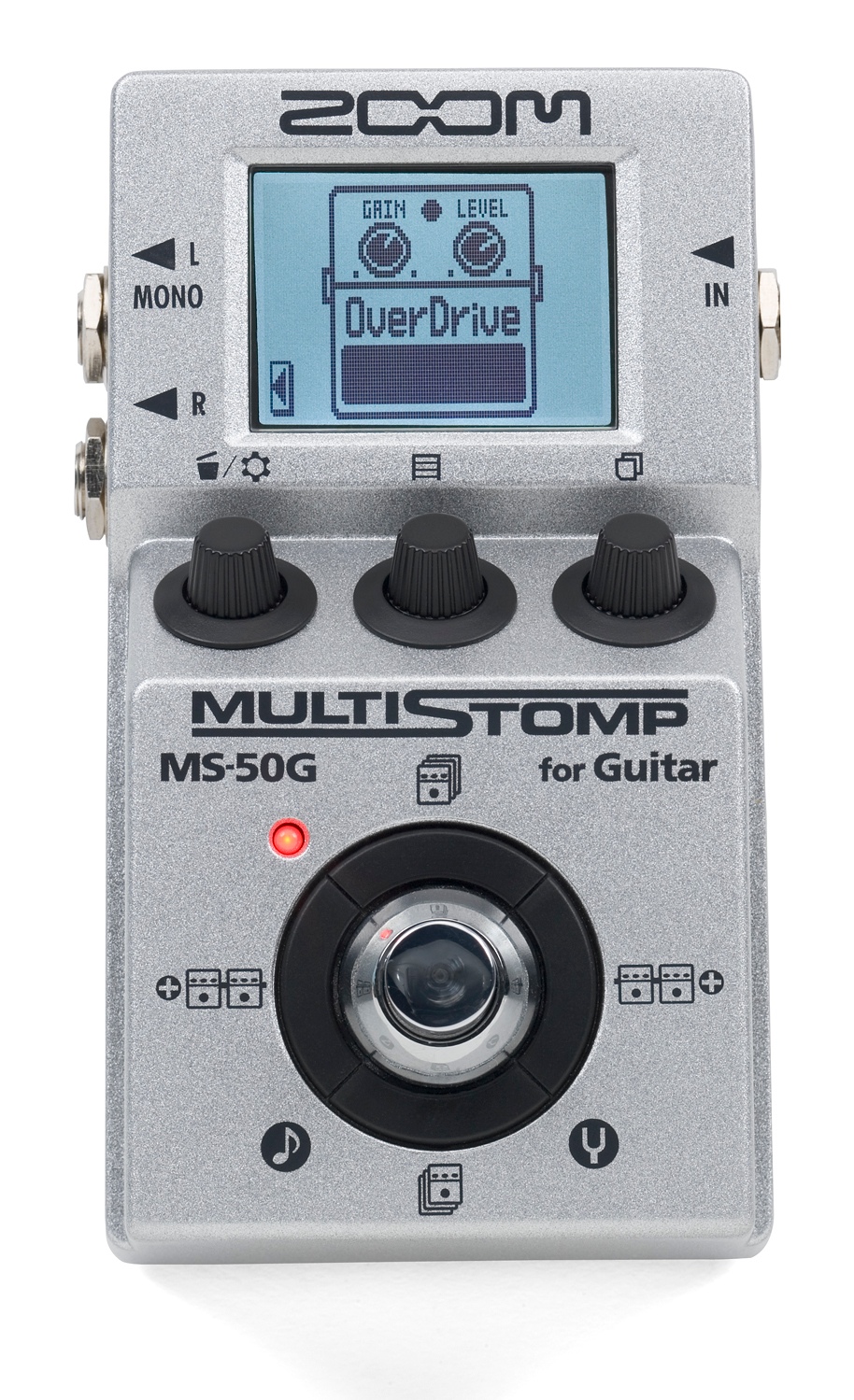
It may sound unbelievable, but it really is true – this small box holds in store a whopping 50 memory slots for your own effect patches. Each effect patch can consist of a signal chain of up to six different effects. The MS-50G offers you 55 different effect types to choose from – featuring everything from compressors and modulation effects all the way to distortions, amp modelling and whacky special effects. Naturally, the MultiStomp also comes equipped with a digital tuner.
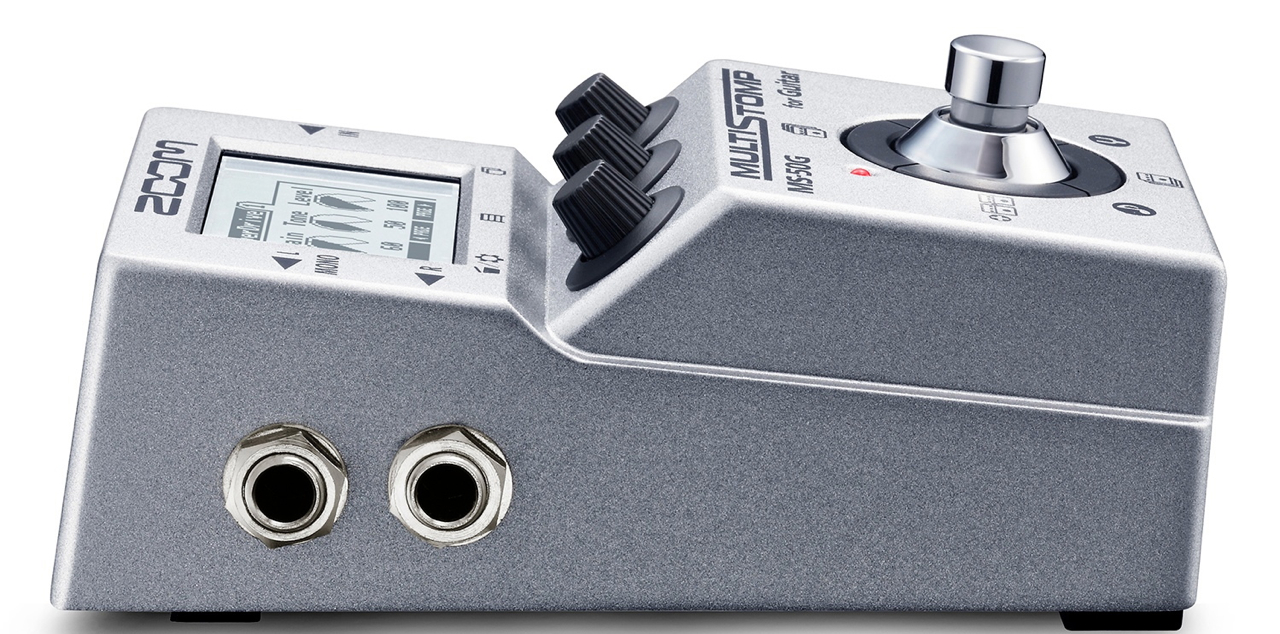
The Zoom MS-50G’s metal casing and its single foot switch feel reasonably chunky. The three parameter control knobs have been mounted at an angle underneath the LCD-display, out of the way of your foot’s path.
The pedal can be used in mono or in stereo. There is no headphones output on the MultiStomp, because it is meant to be used either as a standard guitar effect in front of your amp (or plugged into the effects loop) or for recording, connected straight to the front end of your soundcard or mixing console.

This compact Zoom is powered by two AA-sized batteries, giving you about seven hours of continuous use. Powering the pedal using a PSU (optional) is the more environmentally friendly way of doing things, and Zoom have made it easy for us by sticking to the Boss-standard (9 V, centre plus), making it easy to integrate the MS-50G into your existing pedal board.
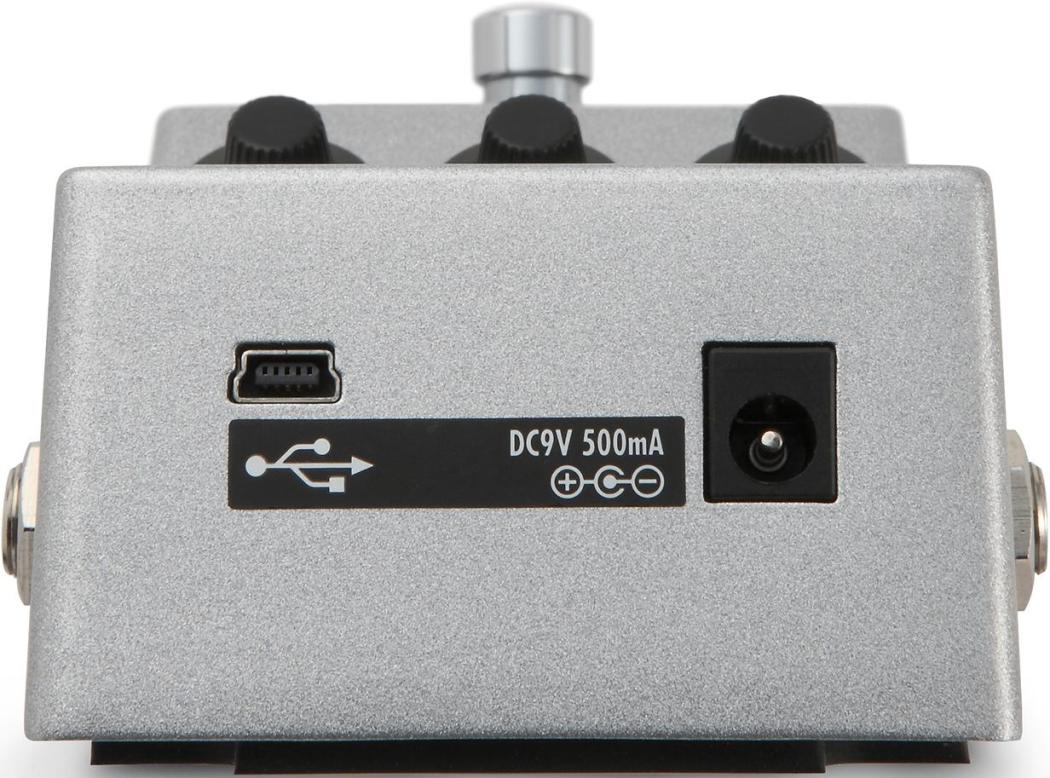
The USB-port on the front of the MultiStomp makes it possible to update the unit’s firmware.
****
There are two main ways of using the Zoom MS-50G’s effect patches:
The first way would be to manually select one patch, and the use the left/right cursor keys to choose the one effect in this patch (like chorus, distortion or delay) that you want to be able to turn on and off using the foot switch while performing. The unit automatically stores which effect you have selected in each given effect patch, so the next time you call up this patch you will already have your chosen effect connected to the foot switch.
The second way of using the Zoom is by utilising the MS-50G’s A/B-mode. A/B-mode allows you to select all the effect patches you will want to use, and put them in a running order by assigning a letter to each of the chosen effects (e. g.: ”SynthStar: A”, ”AsiaPalace: B”, ”PitchDist: C” etc). Once you’ve got your list in order, you can use the foot switch to hop through your list (starting from letter ”A” going up the alphabet). At the end of your list pressing the foot switch will get you back to the first patch in your list.
****
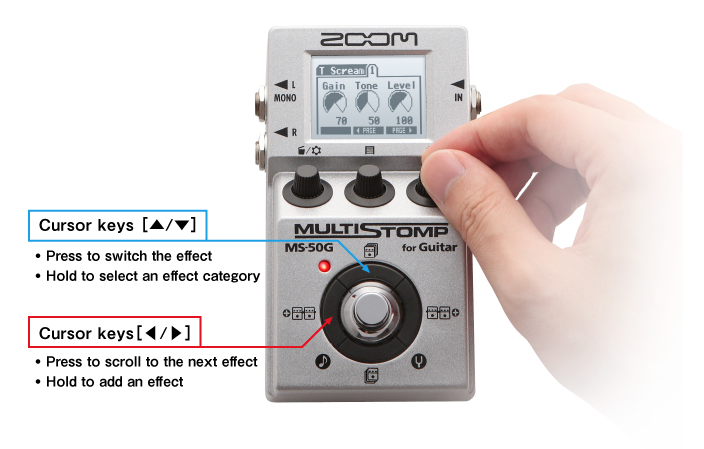
Very compact multieffects usually require a slightly steeper initial learning curve than larger boards, because the limited number of controls and push buttons always means you first have to get to grips with the unit’s user interface. Luckily, thanks to its logical structure and well-designed graphics the MultiStomp is an easy piece of gear to master.

I especially like the Effect Chain view, which makes changes to the order of effects inside a patch very easy. You simply lift the chosen module using the virtual magnet, and drop it where you want it to go.
****

Regardless of its compact size, the Zoom MS-50G MultiStomp is a fully-fledged member of the company’s G-series of guitar multieffects. While the MultiStomp won’t offer you all of the great features and effect types of its larger brethren – the G3 and G5 – the sheer amount of processing power and tasty effects on offer here is truly amazing. For the price of a decent single effect the MS-50G offers you a huge palette of different effects, while only taking up very little space on your pedal board.
****
I used a Tokai SG-75 plugged into the Zoom MS-50G to record all the guitar tracks on the YouTube video:
All of the other soundbites have been lifted from Kitarablogi’s reviews of the Zoom G3 and the larger G5:
Fender Stratocaster – detune – delay
Fender Stratocaster – dirty Tweed – tremolo
Tokai LC-85 – fixed wah – Marshall-type
Tokai LC-85 – phaser – Blackface-style
****
Zoom MS-50G MultiStomp
Current RRP in Finland 99 €
Finnish distributor: Studiotec
****
Pros:
+ value-for-money
+ sound
+ compact size
+ easy to use
+ versatile
****
Japanilaisen Zoomin 9000-sarjan tuotteet olivat 1990-luvulla maailman ensimmäiset huippukompaktit multiefektit kitaralle. Uusi Zoom MultiStomp MS-50G (suositushinta 99 €) jatkaa tätä perinnettä mahduttamalla ison G5-pedaalilaudan (testattu heinäkuussa) digitaalista mallinnusteknologiaa perinteisen pikkuefektin koteloon.
****
Uskomatonta, mutta totta – pikkuloota tarjoaa 50 vapaasti editoitavaa ohjelmapaikkaa, ja jokaisessa efektiohjelmassa (patch) voi ketjuttaa jopa kuusi efektiä peräkkäin. Tarjolla on 55 eri efektityyppiä kompressoreista modulaatioefekteihin ja säröpedaaleista vahvistinmallinnuksiin. Myös kunnon viritysmittari löytyy MultiStompista.
Zoom MS-50G:n metallinen kotelo ja jalkakytkin tuntuvat hyvin kestäviltä. Säätimet on asennettu kynnyksen taakse, siten ettei niihin vahingossa osu kengänpohjalla.
Pedaalissa on kaksi lähtöä, koska sitä voi käyttää joko mono- tai stereofonisena. MultiStompissa ei ole lainkaan kuulokelähtö, sillä se on tarkoitettu puhtaasti lattiaefektiksi livekäytössä tai kytkettäväksi äänikorttiin tai mikseriin studiokäyttöä varten.
Pikku-Zoomi saa käyttövirtansa kahdesta AA-paristosta, joilla luvataan noin seitsemän tunnin yhtäjaksoista soittoaikaa. Virtalähteen (ei kuulu hintaan) käyttö on kuitenkin ympäristöystävällisempi vaihtoehto, ja kun kerran laite on sähkösyötössään Boss-standardiin yhteensopiva, ei tule ongelmia pedaalilautojenkaan virtalähteiden kanssa.
MultiStompin etureunasta löytyy myös USB-portti, joka mahdollistaa laitteen firmewaren päivittämistä.
****
Zoom MS-50G:n efektiohjelmia voi käyttää kahdella eri tavalla:
Ensimmäinen tapa on valita yksi haluttu efektiohjelma, jonka jälkeen pystyy siirtämään navigointinäppäimillä siihen yksittäisiä efektejä, joita haluaa laittaa soiton aikana päälle ja pois MultiStompin jalkakytkimellä (esimerkiksi efektiketjun särö tai chorus). Laite muistaa omatoimisesti jokaisen efektiohjelman kohdalla, mikä yksittäinen efekti oli viimeiseksi valittu päälle/pois-kytkettäväksi, ja tuo efektiketjun seuraavalla kerralla jälleen samalla tavalla näkyviin.
Toinen tapa on käyttää Zoomia A/B-tilassa. A/B-tilassa valitaan ohjelmalistalta niitä efektiohjelmia, joita halutaan käyttää, asettamalla niille järjestyksen kirjaimilla (esimerkiksi: ”SynthStar: A”, ”AsiaPalace: B”, ”PitchDist: C” jne.). Valinnan jälkeen jalkakytkimen polkaisu vaihtaa yhdestä ohjelmasta seuraavaan järjestyskirjainten aakkosjärjestyksessä. Viimeisen efektiohjelman kohdalla hypitään kytkinpolkaisulla takaisin valittujen ohjelminen alkuun.
****
Hyvin kompaktissa efektilaitteessa täytyy aina ensin oppia laitteen käyttölogiikka, koska yleensä runsaat ominaisuudet ja parametrit ovat ohjailtavia rajoitetulla määrällä painikkeita ja säätimiä. Lyhyen tutustumisajan jälkeen Zoomin MultiStompilla tulee kuitenkin erittäin hyvin toimeen, sen loogisen käyttöliittimen ja hyvän graafisen toteutuksen ansiosta.
Erinomainen Effect Chain -näkymä auttaa suuresti hahmottamaan jokaisen efektiohjelman signaalitietä. Virtuaalisen magneetin avulla voi muuttaa yksittäisten efektien järjestystä ”nostamalla” niitä ja siirtämällä niitä yhdestä paikasta toiseen.
****
Pienestä koostaan huolimatta on Zoom MS-50G MultiStomp firman G-sarjan kitaraefektien täysikasvuinen jäsen. Vaikka pikku-Zoomi ei tarjoa kaikkia isoveljiensä – G3 ja G5 – hienouksia ja myös sen efektien määrä on hieman supistettu, on tässä tarjottujen efektien runsaus ja soundin laatu suorastaan ällistyttävä. Perinteisen lattiaefektin hinnalla saadaan tässä siis laadukas multiefekti, joka vie kuitenkin vain yhden pedaalin verran tilaa.
****
Äänitin Zoom MS-50G:llä ja yhdellä sähkökitaralla (Tokai SG-75) Youtube-videon kaikki kitaraosuudet:
Muita soundiesimerkkejä lainasin tällä kertaa Kitarablogin aiemmista Zoom G3- ja G5-jutuista:
Fender Stratocaster – detune – delay
Fender Stratocaster – dirty Tweed – tremolo
Tokai LC-85 – fixed wah – Marshall-type
Tokai LC-85 – phaser – Blackface-style
****
Zoom MS-50G MultiStomp
suositushinta 99 €
Maahantuoja: Studiotec
****
Plussat:
+ hinta-laatu-suhde
+ soundi
+ kompakti
+ helppokäyttöinen
+ monipuolinen

****

The Zoom Q2HD (current rrp in Finland: 205 €) is the company’s brand-new lightweight video recorder. Aside from full-HD video recording this new unit also offers MS-stereo.
In MS-stereo two different microphone types are used to create two discrete signals, called Mid and Sides. The advantages of MS are that placement of the two mics in relation to each other isn’t as critical for overall phase coherence as in other techniques, and that you can adjust the amount of room in relation to the mid-signal during mixing.
Classic MS-stereo uses a cardioid microphone for picking up the mid-signal with a bidirectional mic turned 90 degrees (= shooting sideways) to record the side-sound. You will get a stereo sound picture from these two discrete signals by ”decoding” them: The mid-mic’s signal will be sent to the mixing console and panned dead centre. The sides-mic’s signal must be split to two channels, with one being panned hard left, and the other hard right with its polarity switched.
But, luckily, the Zoom Q2HD’s user won’t have to bother with the technical background, because you are only required to set the correct recording level and choose the stereo width you want from one of the five different options (mono to 150 deg) .
Naturally, the Q2HD can also record with Auto Gain (three settings: Concert, Solo and Meeting), and its high-pass filter will keep low end rumbling at bay.
Zoom’s Q2HD records incoming audio as linear wave-files (44,1/48/96 kHz, 16/24-bit) or using AAC-compression (64–320 kbps, 48 kHz). The unit also allows you to record audio-only files.
****

The Q2HD is a typical Zoom video recorder in the sense that it is used with the unit in a vertical position. All inputs, outputs and controls have been placed on the recorder’s sides, while all transport and menu functions are controlled using the buttons below the crisp two-inch display. There’s even a tiny loudspeaker built in for a quick preview of the recorded material.
The camera uses a 3.2-inch CMOS-sensor with five million pixels, and a fixed focus and aperture (1,32 m – ∞, F: 3,2). There are three lighting presets on offer – Auto, Concert Lighting ja Night – a well as a digital zoom (4 x).
The video is processed and stored in H.264/Mpeg-4-format as MOV-files.
****

The Zoom Q2HD is extremely user-friendly: all of its menu-icons fit onto one screen, and the device’s parameters have been kept to a minimum. The unit’s well-made graphics enhance the user-experience nicely.
The Q2HD is powered by two AA-batteries (or rechargeables), giving you approximately two hours of video filming or four hours of audio recording.
****

You can watch recorded video in a slightly larger format using Zoom’s Landscape-feature (see picture above).
Zoom’s Q2HD also lets you perform the most basic of video editing inside the recorder itself , offering Divide- and Trim-operations.
****
Zoom also supply their basic Handy Share software on the mini-SD-card that comes with the recorder. The software works on both Windows- (XP 32-bit or better) and Mac-run computers (Mac OSX 10.4.6 or better).

Handy Share offers basic video editing…
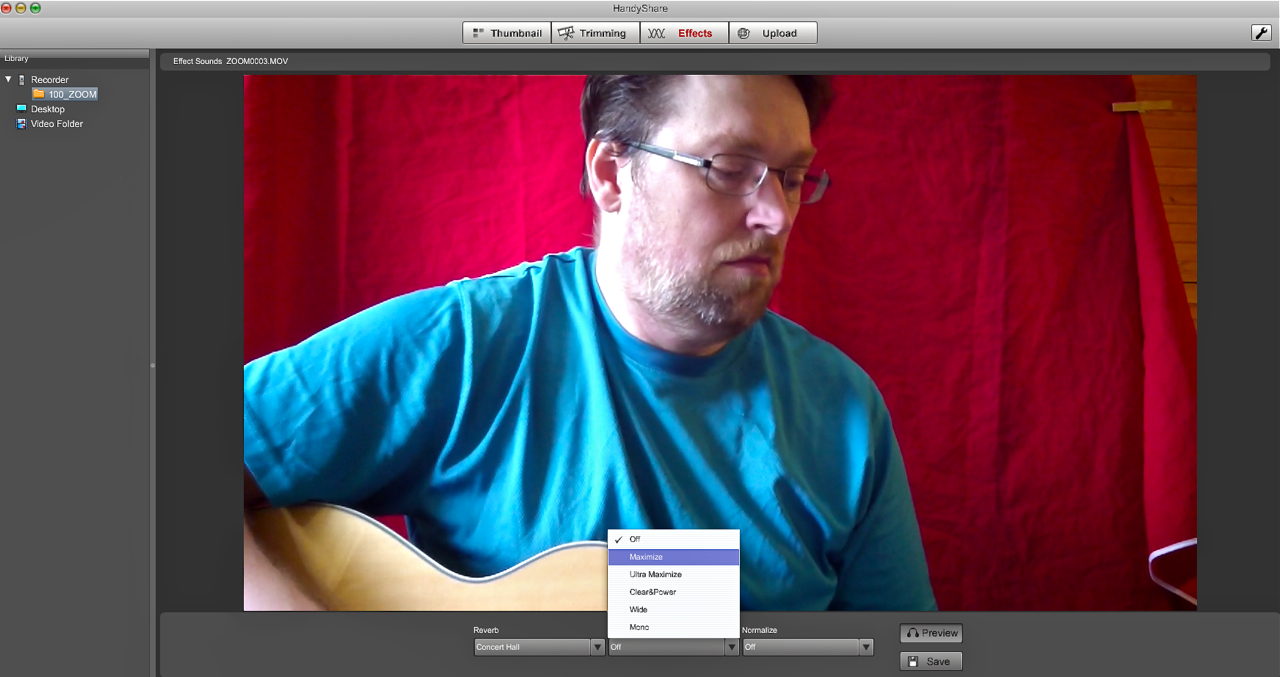
…as well as audio processing using reverb, compression and normalisation. The audio effects can be previewed before rendering them to the video-file.
Zoom’s Handy Share is quite OK for starters, even though many free video editing programmes, like Windows’ Movie Maker or Apple’s iMovie, will offer a lot more features and larger scope for adjustment.
****

The Zoom Q2HD can also be used as a stereophonic usb-microphone, or as a webcam for chatting or live-streaming (for example via UStream). In streaming mode Zoom’s handy delay-parameter allows you to compensate for audio-video-offsets (bad synchronisation).
****
In my opinion the Zoom Q2HD is a nice little tool for making You Tube -videos.
Although the video quality of some digital still cameras is even better than that of the Zoom, the Q2HD’s far superior audio will swing many buying decisions.
The Zoom Q2HD’s clean and clear audio will enable you to make full-HD net videos you can listen to, as well as watch.
The following audio snippets were recorded to give you an idea of what the different stereo-width settings sound like. The distance between the Q2HD and the acoustic guitar stays the same from clip to clip:
****
Zoom Q2HD
205 €
Finnish distributor: Studiotec
Pros:
* HD-video
* quality MS-stereo sound
* easy to use
* lightweight
* can also be used as an MS-stereo usb-microphone
* can be used to stream video
****
****
Zoom Q2HD (suositushinta 205 €) on firman uusin pikkukokoinen videotallennin, joka tarjoaa HD-resoluution kuvan lisäksi uutena ominaisuutena MS-stereoäänityksen.
MS-stereossa käytetään kaksi eri mikrofonia tallentamaan stereokuvaa – yksi äänittää vain keskipistettä ja toinen äänittää ainoastaan stereon sivut. Tämän äänitystavan suurin etu on, että stereokuvan leveyttä ja tilan syvyysvaikutelmaa voi säätää muutamalla sivumikrofonin signaalitasoa.
Klassisessa MS-stereossa keskimikrofonina käytetään herttakuvioista mikkiä ja sivumikikkinä 90 astetta sivuun käännettyä kahdeksikkoa. Näistä kahdesta monomikrofoneista saadaan stereokuva käyttämällä kolmea mikserikanavaa – keskimikrofonin panoroidaan stereokuvan keskellä, kun taas sivumikin signaali splitataan kahdeksi signaaliksi, joista toinen panoroidaan sellaisenaan täysin vasemmalle ja toinen täysin oikealle, mutta käännetyllä vaiheella.
Onneksi kaiken tämän teorian Zoom Q2HD:n käyttäjän ei tarvitse osata – laitteessa täytyy säätää ainoastaan tutulla tavalla mikrofonin signaalitasoa, sekä uutena ominaisuutena haluttua stereokuvan leveyttä. Tarjolla on täysin monofoninen signaali, sekä viisi erilaista stereoleveyttä 30:stä asteesta 150:een asteeseen saakka.
Käsisäädön lisäksi tulosignaalin tasoa voi säättää myös automaattisesti kolmella eri Auto Gain -vaihtoehdolla (Concert, Solo, Meeting), ja Q2HD:n bassoleikkuri pitää bassot kurissa.
Audiota tallennetaan Zoom Q2HD:ssä joko lineaarisena wav-tiedostoina (44,1/48/96 kHz, 16/24-bit) tai datakompressoidussa AAC-muodossa (64–320 kbps, 48 kHz). Laite mahdollistaa myös pelkkien audiotiedostojen äänittämistä.
****
Q2HD on tyypillinen Zoom-videotallennin siinä suhteessa, että sitä käytetään kuvaus- ja äänitystilanteessa pystyasennossa. Laitteen liittimet ja säätimet on sijoitettu kotelon sivuihin, kun taas transportti ja navigointi hoidetaan hyvin terävän kahden tuuman näytön alla olevilla napeilla. Navigointinappien viereen on mahdutettu jopa pikkuinen kaiutin nopeata videon katselua varten.
Kamera käyttää 3,2-tuumaisen viiden miljoonan pikselin CMOS-kennoa kiinteällä tarkennuksella ja aukolla (1,32 m – ∞, F: 3,2). Tarjolla on kolme valoitusvaihtoehtoa – Auto, Concert Lighting ja Night – sekä nelinkertainen digitaalinen zoom.
Videosignaali tallennetaan H.264/Mpeg-4-formaatissa mov-tiedostoina.
****
Zoom Q2HD on erittäin käyttäjäystävällinen laite: kaikki valikot mahtuvat yhteen näkymään, ja säädettävien parametrien määrä on pidetty alhaisena. Erittäin onnistunut graafinen toteutus tukee laitteen positiivista käyttökokemusta.
Laite saa käyttövirtansa kahdesta AA-kokoisesta paristosta (tai akusta), jotka kestävät videokäytössä noin kaksi tuntia ja audiokäytössä noin neljä tuntia.
****
Tallennettuja pätkiä pystyy myös katsomaan hieman isompana landscape-ominaisuuden ansiosta.
Zoom Q2HD myös mahdollistaa pienimuotoista videoeditointia itse laitteessa – tarjolla ovat pidemmän videon pätkimästä useampiin osiin (Divide), sekä alku- ja loppukohtien siirtäminen (Trim).
****
Laitteen mukana tulevalla mini-SD-kortilta löytyy Zoomin kevyt editointi- ja muokkaussofta Handy Share, joka toimii sekä Windows- (XP 32-bit tai parempi) että Mac-ympäristöissä (Mac OSX 10.4.6 tai uudempi).
Handy Share -ohjelma tarjoaa kevyttä videoleikkausta…
…sekä audion muokkausta kaiulla, kompressorilla ja normalisoinnilla. Audioefektejä voi esikuunnella, ennen kuin tallentaa muutokset suoraan videotiedostoon.
Handy Sharella pääsee kyllä kivasti videoeditoinnin alkuun, mutta se ei vedä vertoja edes Windows Movie Maker- tai Apple iMovie -tyylisten ilmaisohjelmien käyttömukavuudelle ja muokkausmahdollisuuksille.
****
Stand-alone laitteena lisäksi Zoom Q2HD:tä voi käyttää usb-portin kautta stereofonisena usb-mikrofonina audiosekvenssereissä tai nettikamerana chattailua tai striimausta varten (esim. UStream-palvelun kautta). Kätevällä Delay-säädöllä voi jopa poistaa striimauksessa usein syntyviä synkkaongelmia kuvan ja audion välillä.
****
Mielestäni Zoom Q2HD on todella hyvin toimiva kokonaisratkaisu omia You Tube -videoita tekevälle artistille tai bändille.
Vaikka järjestelmäkameroilla tai joillakin älypuhelimilla pystyy nykypäivällä kuvaamaan jopa Zoomia laadukkaampia videoita, on niiden audiopuoli usein melko surkea. Etenkin syvät bassot saavat niissä kameroissa signaalin nopeasti pumppamaan ja säröille.
Juuri sen monipuolinen, puhdas ja laadukas audio-osasto on mielestäni Zoom Q2HD:n suurin valtti. Se mahdollistaa hyvin mutkatonta livetallenteiden tekoa, jossa kunnollisen HD-videon pariksi saadaan myös laadukas ja dynaaminen ääni samasta kevyestä laitteesta.
Seuraavissa audiopätkissä esitetään Zoomin stereoasetuksien vaikutusta akustisen kitaran äänityksessä. Q2HD:n etäisyys kitaraan pysyy koko ajan samana:
****
Zoom Q2HD
205 €
Maahantuoja: Studiotec
Plussat:
* HD-video
* laadukas MS-stereoääni
* helppokäyttöinen
* kevyt
* toimii myös MS-stereofonisena usb-mikrofonina
* videostriimaus
****


The Zoom G5 (current price in Finland: 265 €) is the Japanese company’s brand-new flagship guitar effect pedalboard.
The easy-to-use G5 is built with the same user interface as the smaller G3 and B3 units, which were reviewd by Kitarablogi.com earlier. When in Home-view – that is when the single effects making up an effect patch are shown in the unit’s displays – the Zoom works just like like a pedalboard containing separate effects: Each effect has its own display showing an icon that gives you a good idea of the type of effect in use, and the most important parameters can be adjusted directly via three control knobs beneath each display.
The Zoom G5 broadens this idea by offering up to nine effects per patch, even though the unit only has four sets of displays, knobs and footswitches. This problem is solved by using the Scroll-buttons above the displays, which enable you to change which part of the effect chain you are currently viewing. Using the Scroll-buttons you call up the effects you want to edit (or turn on and off on-the-fly). When switching to another effect patch the G5 automatically stores your last Scroll-position, so when you return to the patch you’ve just left your choice of effects will be called up into the displays.

The plethora of different effect types on offer in the Zoom G5 is truly mind-boggling – you can choose between 145 different effect types, from a wealth of excellent amp models and basic effects to some really far out synth and sci-fi effects.
The effect patches are stored in 99 banks of three patches each. The G5 comes chock full of fine presets, but everything can be changed and overwritten by the user.

The pedal board offers two more cool features:
The first one is Zoom’s Z-Pedal which adds left-right-functionality to the traditional up-down movement. With the Z-Pedal you are able to control several effects or parameters simultaneously, which opens the door to some far-out sound manipulation.
After the digital effects, but before the analogue outputs, Zoom have placed a genuine Tube Booster to warm up your tones or boost you solos. The Tube Booster offers a whopping 16 dB of boost!
Naturally, the G5 also includes the G3’s rhythm box and cool looper.

The back panel offers all the connectors you’d expect from a pro-class digital effects pedalboard, catering for your live and studio needs.
You can update the G5’s firmware via the unit’s usb-port. You can also use your computer to design, edit and share your own effect patches, once you’ve downloaded Zoom’s free Edit & Share -software (PC & MAC).
The G5 also works as a usb-soundcard (44,1 kHz/16-bit) in conjunction with your audio-sequencer (PC & MAC). If you don’t already own recording software, don’t worry – Zoom is throwing in Steinberg’s Cubase LE 6 to get you recording right away.
****
Zoom’s G5 is a fantastic unit and easy to use. The variety of tones and effects on offer is so great that describing everything in words would take up way too much space. Suffice it to say that in my opinion Zoom’s latest offering is their best guitar pedalboard so far! In light of the sound quality on offer, as well as the unit’s sturdy physical build, the price of the Zoom G5 seems like a real bargain to me.
Here are a few soundbites using some of the factory patches:
DZ Drive + Booster – Stratocaster
Match30 + Booster – Stratocaster
US Blues + Booster – Stratocaster
****
Zoom G5
Current price in Finland: 265 €
Finnish distributor: Studiotec
Pros:
+ sound
+ sturdy build
+ very wide range off effects
+ intuitive user interface
+ Z-Pedal
+ Tube Booster
+ USB-soundcard
+ bang-for-the-Euro
****




 Kitarablogi.com – Finland's premier Guitar and Bass blog